← Back to work
Nike Color Hub

ROLE
Senior Product Designer
TIMELINE
2 Years (2022-2024)
TEAM
2 Designers, 1 PM, 7 engineers
TOOLS
Figma & Miro
Overview
The Nike ColorHUB is an intuitive color library experience integrated into the Digital Creation Ecosystem that enables designers and developers to access, find, use, and manage Nike Colors and Nike Color Palettes.
The Challenge
Accurate color information is hard to find and manage, causing difficulties for product teams. The scarcity of reliable, usable color data sources, and skepticism towards digital color reproduction, has necessitated reliance on physical tools.
Opportunity
By creating a centralized, user-friendly digital color library, we can make accurate color information easier to find and manage. This will reduce reliance on physical tools and increase confidence in digital color reproduction, improving the workflows for product teams.
Approach
Research
Focus Areas
User Needs
Synthesis
Persona
User Journey
Ideation
Wireframes
Information Architecture
User Flows
Validation
Design
High-fidelity Designs
Interaction Design
Prototyping
Validation
Evaluation
Usability Testing
Feedback & Iteration
Research
Through interviews, job shadowing, and targeted questions, we gained a comprehensive understanding of the color design and development process, identifying key areas for improvement.
This research informed the creation of a persona, mapped the process in a journey map, and clarified user needs to guide our solution.
User Persona

Sam
FREE THINKER

Location
World Headquarters

Role
Color Designer

Tools
Adobe PDF, PCX, PCM, Excel, Outlook, Powerpoint

Collaborators
Footwear designers, PCC counterparts, Category teammates
Motivation
Storytelling through color
Pioneering color innovation
Fostering creativity in color workflows
Responsibilities
Stay ahead of color trends
Document and communicate color narratives
Develop seasonal color palettes
Curate and share color inspiration
Tell the seasonal story through color
What's NOT working
Too many statuses for a single color, causing confusion and inefficiencies
Digital swatches in Miro often don't match the physical counterparts
Physical swatch books are hard to navigate and make finding colors difficult
Long ordering processes make it hard to assess material achievability
Sam's Journey
Select possible color(s) to palette
Color designers look at colors that are for a single season, 6 months, and an entire year.
Review selection with functional color teams
Based on these feedback sessions, central color will adjust the palette iteratively to make sure it is meeting functional color's needs.
Compare color with
different database
Compare desired colors to existing Nike colors.
If colors do not already exist in the Nike palette then color designs might explore other color tools such as Coloro.
Review selection with global material team
When a Central Color wants a net new color, they collaborate with GLAM.
GLAM coordinates with color vendors and factories to assure achievability and color fastness, per substrate.

PAINPOINTS
A lot of back and forth debate
Searching many databases for colors
A lot of back and forth between groups
Trying to find the right colors to meet each groups needs
Searching in multiple places
Not easy to find existing colors
Waiting for color achievability
Finding alternative colors for specific materials when colors aren't achievable
Ideation
Through ideation and validation, we were able to define the design requirements, which we then periodically validated with the core user group using various concepts.

Focus Areas
ACCESS COLOR
Search
Filter & Sort
Grid & List Views
Color Details
Image Color Identifier
UTILIZE COLOR
Export
Color Chips (png, jpeg)
Adobe Swatch File (ase)
Data Export (csv)
MANAGE COLOR
Add New Color
Edit Existing Color
Create Palette
Publish Palette
HI-fidelity Designs
ACCESS / LIST & GRID VIEW

List View Color Library

Grid View Color Library
ACCESS / SEARCH

Advanced Search Color Library

Image Analysis Image Color Search
ACCESS / FILTER & SORT

Palettes Filter Color Library

Color Properties Filter

Achievability Filter

Categories Sort
ACCESS / COLOR DETAILS

Color Detail Card Color Library

Color Detail Page Color Library
UTILIZE / EXPORT
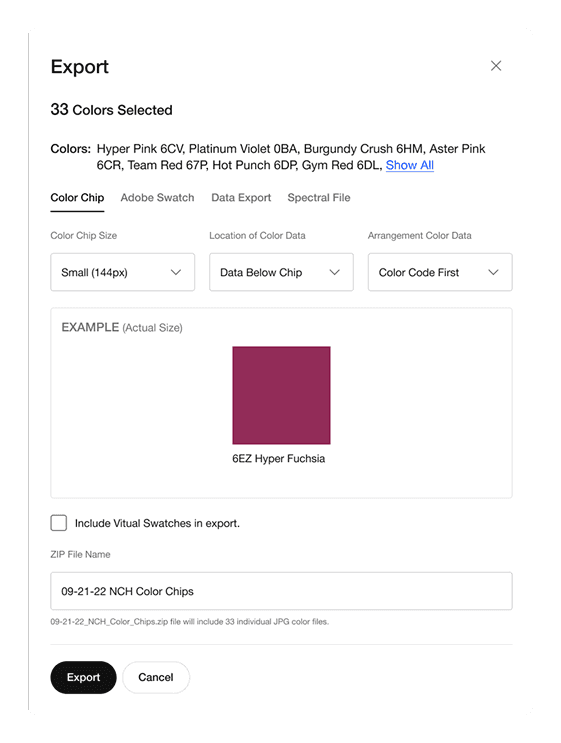
Export Modal Color Library

Export Modal Color Library
MANAGE / CREATE COLOR PALETTE

Create New Palette Color Palettes

Side Shelf Color Palettes
MANAGE / PALETTE DETAILS

Palette Detail Page Color Palettes

Palette Summary Color Palettes
HELP & SUPPORT

Options Help & Support Page

Learning Modal Just Tour It
Impact Metrics
We launched our product to streamline how color designers communicate the Spring/Summer 2023 Color Palette. Since then, it has expanded to Footwear and Apparel design and development, simplifying access to color data, increasing confidence, and replacing eight static tools.
Finding color effort measured
0 being no effort, 5 being the most effort
4.5
PRE-LAUNCH
0.9
POST-LAUNCH
User Testimonials
“Whomever/whatever team is developing this tool is a saint. Centralized, easily browsable color info is a BIG DEAL. Downloading palettes is ANOTHER BIG DEAL. Thank you, thank you, thank you.”
-Apparel Designer
“ColorHUB is revolutionary. It will be a game changer for how multiple teams share out color palette information.”
-Sr. Design Director, Color Palette
Reflections
USER FEEDBACK
One key takeaway was recognizing the importance of balancing detailed feedback with maintaining a seamless user experience. We discovered that even small adjustments to display settings could greatly impact user satisfaction.
COLLABORATION
Regular work sessions with product and engineering teams were crucial in ensuring every step of the design process was technically feasible while aligning with both user and business needs. This collaborative approach enabled us to iterate confidently and make more informed, effective decisions.