← Back to work
Nike Development Hub
A full redesign of first-run experience that cut time-to-value by 40% and raised week-one activation — without adding more steps.
ROLE
Senior Product Designer
TIMELINE
2 Years (2024-2025)
TEAM
1 Designer, 1 PM, 8 engineers
TOOLS
Figma, Miro, CursorAI
Overview
Nike, one of the biggest names in fashion history, has been a powerhouse in designing, developing, and innovating foot and sportswear for over 50 years. The legacy tools they've used hasn't changed much since.
This project's intention was to streamline and modernize product development tools to deliver on Nike’s promise of product excellence and sustainability.
I led discovery, mapped pain points across the existing flow, and was responsible for designing the product development platform while working closely with the product manager, technical engineer and engineer team.
The Nike ColorHUB is an intuitive color library experience integrated into the Digital Creation Ecosystem that enables designers and developers to access, find, use, and manage Nike Colors and Nike Color Palettes.
The Challenge
An outdated, manual product development process across disconnected tools caused data inconsistency, version control issues, and integrity risks.
Accurate color information is hard to find and manage, causing difficulties for product teams. The scarcity of reliable, usable color data sources, and skepticism towards digital color reproduction, has necessitated reliance on physical tools.


Opportunity
By creating a centralized, user-friendly digital color library, we can make accurate color information easier to find and manage. This will reduce reliance on physical tools and increase confidence in digital color reproduction, improving the workflows for product teams.
Product Team Design Process
Approach
Research
Conducted user interviews and gathered feedback from demos and screen recordings to identify user needs and product opportunities.
Research
Focus Areas
User Needs
Feature Scope
Met with stakeholders to define the feature based on research insights. We aligned on MVP priorities while also mapping out ideas for future iterations.
Synthesis
Persona
User Journey
User Flow & Designs
Created user flows, wireframes, and high-fidelity designs to visualize the experience. These helped the team align on structure, interaction, and visual direction early.
Ideation
Wireframes
Information Architecture
User Flows
Validation
Feedback
Collaborated with developers to refine patterns for performance and feasibility. Collected user feedback through prototypes to validate whether the design met their needs.
Design
High-fidelity Designs
Interaction Design
Prototyping
Validation
Final Designs
Incorporated input from users, developers, and stakeholders to finalize designs. Ensured clarity, consistency, and design system alignment for a smooth build process.
Evaluation
Usability Testing
Feedback & Iteration
Build & Release
The dev team built the feature based on final designs. After internal QA and product review, it was released to users and monitored for feedback and improvements.
Research
Nike, one of the biggest names in fashion history, has been a powerhouse in designing, developing, and innovating foot and sportswear for over 50 years. The legacy tools they've used hasn't changed much since.
I led discovery, mapped pain points across the existing flow, and redesigned onboarding around progressive disclosure: show value first, collect detail only when it’s needed.
Through interviews, job shadowing, and targeted questions, we gained a comprehensive understanding of the color design and development process, identifying key areas for improvement.
This research informed the creation of a persona, mapped the process in a journey map, and clarified user needs to guide our solution.
User Persona


Jackson
Sam
WHQ FOOTWEAR TECH DEVELOPER
FREE THINKER

Location
World Headquarters

Role
Footwear Tech Developer
Color Designer

Tools
Adobe PDF, PCX, PCM, Excel, Outlook, Powerpoint

Collaborators
Footwear designers, PCC counterparts, Category teammates
Ensures the FW product is hitting the brief according to what marketing and design have defined
Communicates to the product team the cost drivers and inform/influence product teams for any necessary cost value trade-offs
Delivers maximum product value to the consumer ensuring every penny spent is deliberate
What's working
Motivation
Great teammates.
Macros are fantastic in the CBD to find things quickly
The CBD's excel version is you can customize the sheet to look at the most relevant information.
Storytelling through color
Pioneering color innovation
Fostering creativity in color workflows
Responsibilities
Stay ahead of color trends
Document and communicate color narratives
Develop seasonal color palettes
Curate and share color inspiration
Tell the seasonal story through color
What's NOT working
Unable to provide the complete costing picture of material and labor.
Frustrated by the overwhelming amount of data that don't need
Need to be proactive versus reactive with product costs.
Getting the Previous CBD is not possible, so it is hard to make a comparison with the old ones
After CDA, now its only me (costing), instead of collaborating with someone else (costing engineers)
It is hard to make updates on one material price and seeing the change
Too many statuses for a single color, causing confusion and inefficiencies
Digital swatches in Miro often don't match the physical counterparts
Physical swatch books are hard to navigate and make finding colors difficult
Long ordering processes make it hard to assess material achievability
Sam's Journey

Select possible color(s) to palette
Color designers look at colors that are for a single season, 6 months, and an entire year.
Review selection with functional color teams
Based on these feedback sessions, central color will adjust the palette iteratively to make sure it is meeting functional color's needs.
Compare color with
different database
Compare desired colors to existing Nike colors.
If colors do not already exist in the Nike palette then color designs might explore other color tools such as Coloro.
Review selection with global material team
When a Central Color wants a net new color, they collaborate with GLAM.
GLAM coordinates with color vendors and factories to assure achievability and color fastness, per substrate.
A lot of back and forth debate
Searching many databases for colors
A lot of back and forth between groups
Trying to find the right colors to meet each groups needs
Searching in multiple places
Not easy to find existing colors
Waiting for color achievability
Finding alternative colors for specific materials when colors aren't achievable
PAINPOINTS
Hi-fidelity Designs
Ideation
DASHBOARD
Through ideation and validation, we were able to define the design requirements, which we then periodically validated with the core user group using various concepts.


DETAIL PAGE / SCENARIO PLANNING


Focus Areas
ACCESS COLOR
Search
Filter & Sort
Grid & List Views
Color Details
Image Color Identifier
UTILIZE COLOR
Export
Color Chips (png, jpeg)
Adobe Swatch File (ase)
Data Export (csv)
MANAGE COLOR
Add New Color
Edit Existing Color
Create Palette
Publish Palette

List View Color Library
Grid View Color Library

HI-fidelity Designs
DASHBOARD
ACCESS / SEARCH

Advanced Search Color Library

Image Analysis Image Color Search
ACCESS / FILTER & SORT

Palettes Filter Color Library

Color Properties Filter

Achievability Filter

Categories Sort
ACCESS / COLOR DETAILS

Color Detail Card Color Library

Color Detail Page Color Library
UTILIZE / EXPORT
Export Modal Color Library
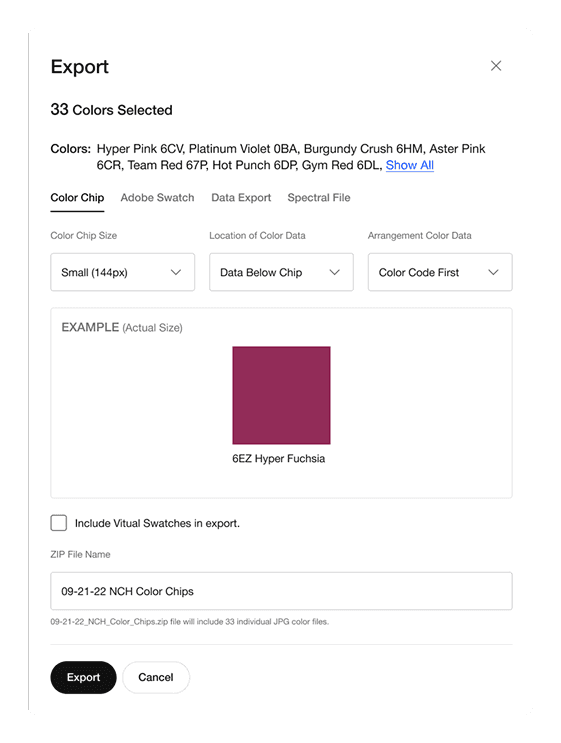
Export Modal Color Library

MANAGE / CREATE COLOR PALETTE
Create New Palette Color Palettes

Side Shelf Color Palettes

MANAGE / PALETTE DETAILS
Palette Detail Page Color Palettes

Palette Summary Color Palettes

HELP & SUPPORT
Options Help & Support Page

Learning Modal Just Tour It

DETAIL PAGE / SCENARIO PLANNING
ACCESS / LIST & GRID VIEW
Prototype
FUTURE STATE


Results

MODERN UI

CENTRALIZED DATA

IN-TOOL COLLABORATION
A modern, centralized platform that speeds collaboration and enables faster, data-driven decision-making.
Impact Metrics
We launched our product to streamline how color designers communicate the Spring/Summer 2023 Color Palette. Since then, it has expanded to Footwear and Apparel design and development, simplifying access to color data, increasing confidence, and replacing eight static tools.
Finding color effort measured
0 being no effort, 5 being the most effort

13,000+
Users
4.5
PRE-LAUNCH

66%+
NPS Score Increase
0.9
POST-LAUNCH

8x Faster
Time spent

Millions+
Saved in costs
User Testimonials
“I like the clean formatting & easy navigation”
“Whomever/whatever team is developing this tool is a saint. Centralized, easily browsable color info is a BIG DEAL. Downloading palettes is ANOTHER BIG DEAL. Thank you, thank you, thank you.”
-Apparel Designer
“This will be really helpful in scenario planning and sharing ideas”
“ColorHUB is revolutionary. It will be a game changer for how multiple teams share out color palette information.”
-Sr. Design Director, Color Palette
“I really like that all of my projects are in one place”
Reflections
PLATFORM POTENTIAL
USER FEEDBACK
Nike has been doing things a specific way for a very long time. Some of the processes are silo'd and some of the legacy tools are upwards of about 30+ years old. There are opportunities to not only update the working model for costing, but to also rethink and modernize the entire development space to allow physical product developers a space where they can do their entire job all in one place.
One key takeaway was recognizing the importance of balancing detailed feedback with maintaining a seamless user experience. We discovered that even small adjustments to display settings could greatly impact user satisfaction.
SME ENGAGEMENT
COLLABORATION
Engaging with subject matter experts is a delicate balance. While it's good to have user input during the design process, I've found that engaging with core users too frequently can hold back progress.
Regular work sessions with product and engineering teams were crucial in ensuring every step of the design process was technically feasible while aligning with both user and business needs. This collaborative approach enabled us to iterate confidently and make more informed, effective decisions.
STAKEHOLDER EXPECTATIONS
When I came into this project, there had already been an effort to modernize the costing process. Once I joined there were timelines and expectations around design deliverables. Part of managing expectations was to have frequent syncs with product and engineering teams to discuss timelines and deliverables. This allowed for a collaborative and transparent working relationship.